Potential Scenario
Most Councils pay suppliers directly and record invoices with VAT in Easy PC Accounts.
Occasionally, the Clerk, RFO or a Councillor may purchase an item on behalf of the Council using their own personal funds. In these cases, the Council will usually want to reimburse the individual and recover the VAT element, as the purchase was made for Council business as a non-business transaction.
This can be challenging because:
- A simple reimbursement does not allow VAT to be reclaimed
- Most Councils do not operate petty cash
- Adding balancing transactions to the main bank account can make reconciliation and reporting harder to follow
Suggested Process Flow
The process described below is a suggested workflow to help Councils manage reimbursed purchases while recovering VAT and keeping accounts clear.
Easy PC Accounts does not require transactions to be recorded in this way.
Each Council, Clerk or RFO should decide how best to manage these transactions in line with their own procedures, audit requirements and local practices.
This example demonstrates one practical approach that avoids petty cash, supports VAT recovery, and prevents the main bank account becoming cluttered with internal balancing transactions.
Using an “Expenses” Bank Account
A simple way to manage these transactions is to create a separate internal bank account, for example called “Expenses”.
- Supplier transactions (including VAT) are recorded in the Expenses account
- A balancing transaction ensures the Expenses account always returns to zero
- Reimbursements are paid from the main bank account as normal
- VAT is still included automatically in the VAT 126 return
Creating an “Expenses” Bank Account
The Expenses bank account used in this example is an internal account only.
It does not represent a real bank account.
When creating the account in Easy PC Accounts:
- Create a new Bank Account
- Name it Expenses (or similar)
- Set the opening balance to £0.00
- Do not link it to an actual bank account
The account is used only to hold supplier transactions and balancing entries relating to reimbursed purchases.
Because each supplier payment is matched with a balancing transaction, the Expenses account will always return to a zero balance.
Worked Example: Reimbursing a Purchase and Recovering VAT
Scenario
A Councillor purchases printer ink for Council use and pays using their own funds.
The VAT receipt shows:
- Net amount: £100.00
- VAT (20%): £20.00
- Total (Gross): £120.00
The Councillor submits the receipt to the Council for reimbursement.
Step 1 — Record the Supplier Payment
(Expenses Bank Account)
In the Expenses bank account, enter the supplier payment using the VAT receipt.
| Field | Amount |
|---|---|
| Net amount | £100.00 |
| VAT | £20.00 |
| Total | £120.00 |
| VAT Code | Standard (Supplier VAT) |
This records the supplier cost and VAT correctly for VAT recovery.
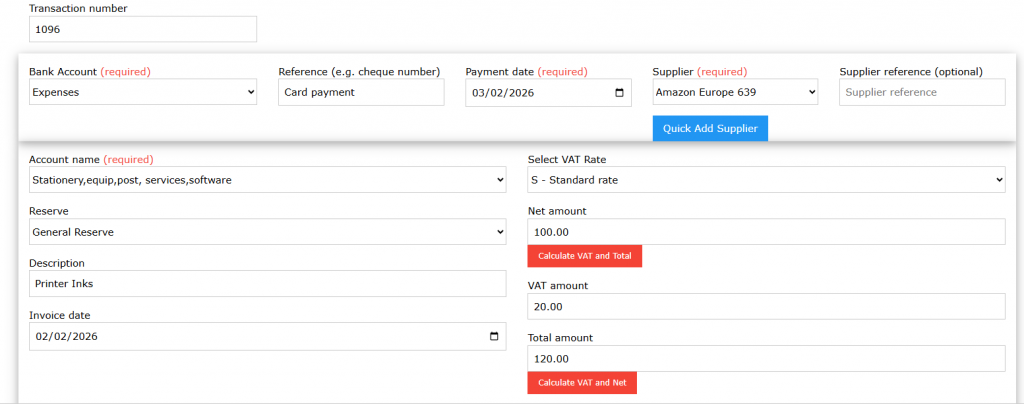
📸 Screenshot: Supplier payment showing net, VAT and total in the Expenses account
Step 2 — Add the Balancing Payment Transaction
(Expenses Bank Account)
Still in the Expenses bank account, add a balancing payment transaction to return the account to zero.
| Field | Amount |
|---|---|
| Net amount | –£120.00 |
| VAT | £0.00 |
| Total | –£120.00 |
| VAT Code | Out of Scope |
This transaction has no VAT and simply offsets the supplier payment.
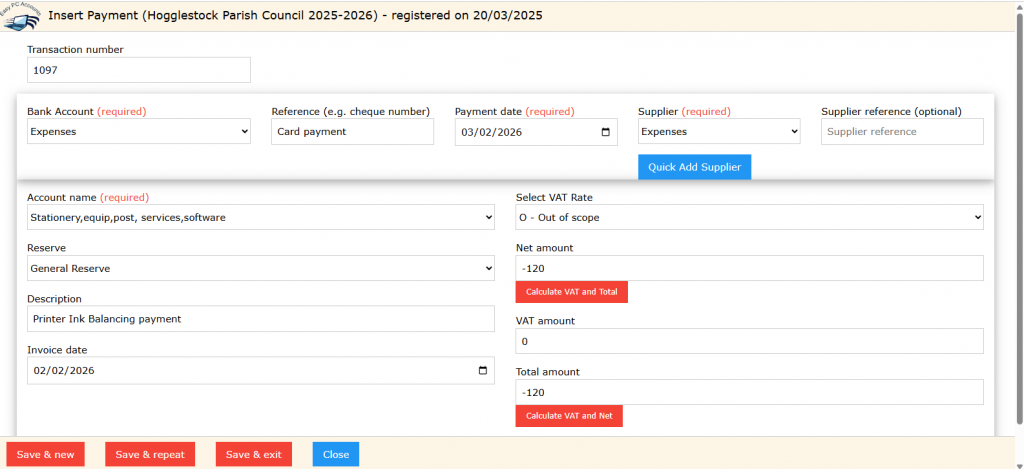
📸 Screenshot: Balancing Out of Scope transaction showing zero VAT
Step 3 — Reimburse the Individual Payment
(Main Bank Account)
From the main bank account, record the reimbursement payment to the Councillor. Do not enter VAT on the reimbursement payment.
| Field | Amount |
|---|---|
| Net amount | £120.00 |
| VAT | £0.00 |
| Total | £120.00 |
| Description | Reimbursement – Printer Ink |
Reconcile this payment as normal against the bank statement for the Main Bank Account.
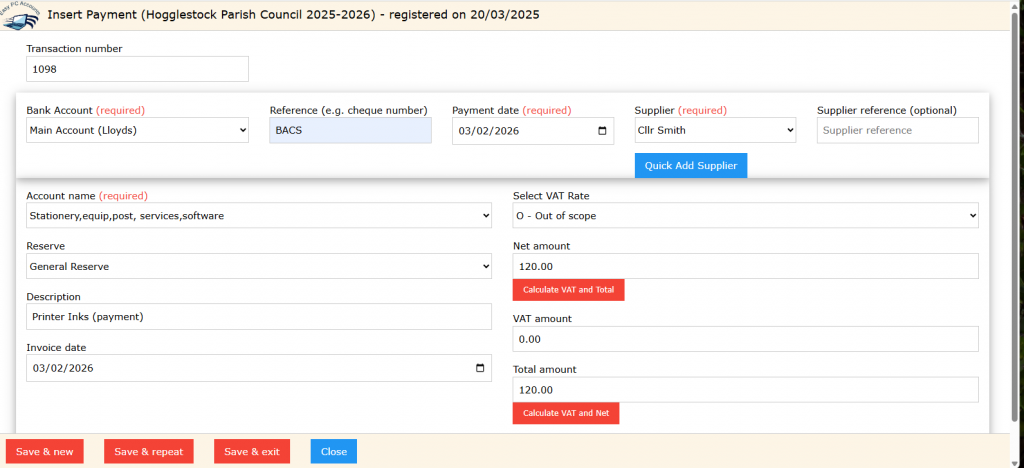
📸 Screenshot: Reimbursement payment from the main bank account
Bank Reconciliation
Reconcile the main bank account against the bank statement as normal.
This keeps the reconciliation report clear and avoids internal balancing transactions appearing on the main bank account.
The Expenses account is an internal account that always returns to a zero balance.
If required, it can be reconciled after the VAT claim has been received, or at a time that fits local processes.
Account Balances After Posting
| Account | Balance |
|---|---|
| Expenses | £0.00 |
| Main Bank | –£120.00 |
VAT Position
| Description | Amount |
|---|---|
| VAT reclaimable | £20.00 |
| Included on VAT 126 return | Yes |
VAT is collected automatically from all bank accounts, including the Expenses account, when generating a VAT 126 return.
Key Points to Remember
- VAT is reclaimed using the supplier receipt, not the reimbursement
- The Expenses account always returns to zero
- The main bank account remains uncluttered
- Transaction reports to the Council can exclude the Expenses account if required
- Reconciliation Report contains only the Main Bank Transactions