Section 137 in EasyPC Accounts
Section 137 of the Local Government Act 1972 allows councils to make payments for community benefit where no other specific power exists. The total amount that can be spent each year is limited (for 2026/27 this is £11.60 per elector).
EasyPC Accounts does not treat Section 137 as a separate account. Instead, the simplest way to manage it is to use a dedicated reserve to track spending. This avoids the need to create separate S137 expense codes or change your existing account structure.
Setting up an S137 Reserve
Create a reserve called S137 Reserve (or similar).
At the start of the financial year:
- Calculate your maximum S137 allowance
- Decide how much you want to allocate
- Transfer that amount into the reserve
This gives you a clear working balance for the year.
Recording S137 Payments
When making a payment under Section 137:
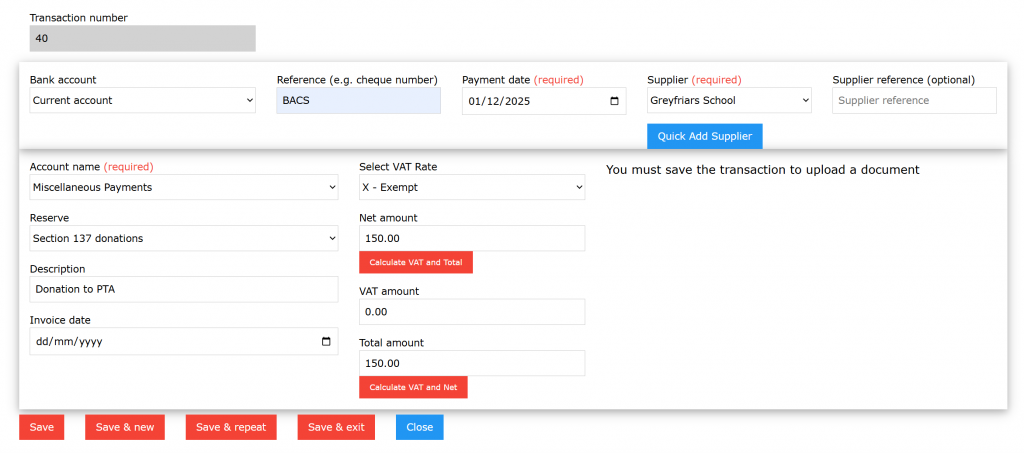
- Record the payment as normal
- Use your existing Account Groups / Account Names (e.g. Grants, Donations, Community Support)
- Allocate the transaction against the S137 reserve
This means you continue to get meaningful reporting by type of spend, while the reserve provides a simple way to track the S137 total.
Note: Account Groups / Account Names may also be referred to as Nominal Codes in other accounting systems
Monitoring Spend
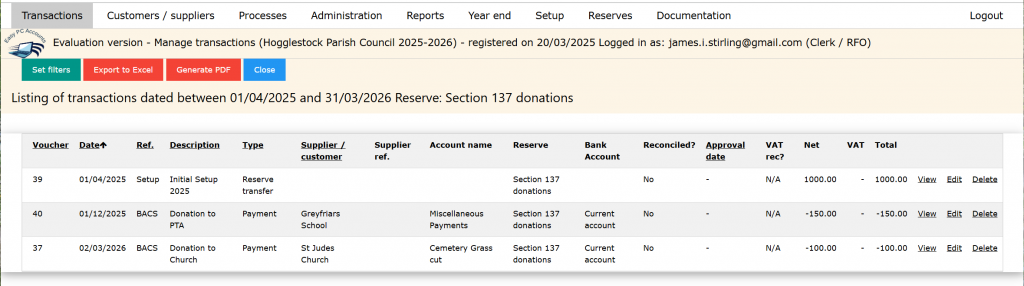
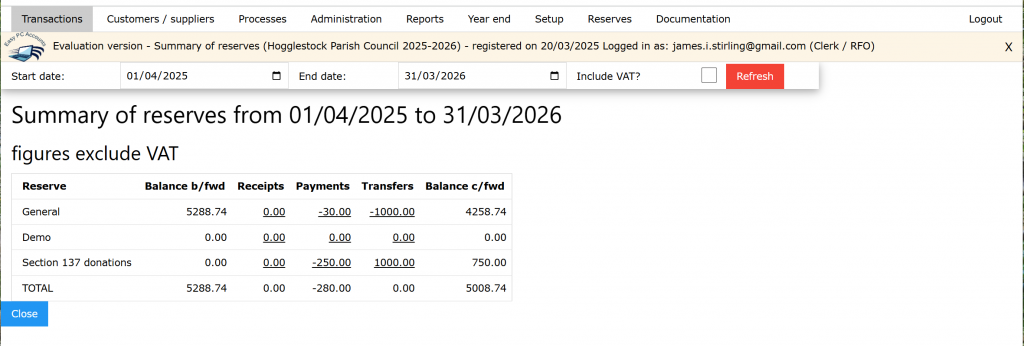
At any point during the year, the reserve will show:
- How much has been spent
- What balance remains
This provides a straightforward check to help ensure you stay within the annual limit.
Year End
At year end, the recommended approach is to reset the reserve:
- Transfer any remaining balance back to the General Reserve
- Set a new allocation for the new financial year
Because the S137 limit changes each year, starting fresh is usually the clearest option.
Why use a reserve?
Using a reserve for Section 137:
- Keeps all transactions grouped together
- Allows you to continue using existing Account Groups and Account Names
- Avoids creating separate S137 expense codes
- Makes reporting straightforward
- Provides a clear audit trail
- Helps avoid exceeding the annual limit
Important
This approach helps with tracking only.
The Clerk and Council remain responsible for:
- Calculating the correct annual limit
- Ensuring each payment meets S137 requirements
- Recording decisions in the minutes